
WordPress SEO for Google AI Overviews: What to Focus On
What WordPress site owners should actually check for Google AI Overviews: indexing, helpful content, Rank Math settings, structured data, internal links and Search Console.
If you run a WordPress site, the most useful thing to know about Google AI Overviews is this: there is no separate trick for them. Google says its AI features in Search draw on the same index and the same ranking and quality systems as regular results. Good AI Overviews SEO is therefore ordinary SEO done properly: pages Google can crawl and index, content that genuinely helps people, and a site structure that makes sense.
What changes is how much careless shortcuts cost you. This guide shows WordPress owners exactly where to look: which settings to check in WordPress and Rank Math, how to improve an existing article, how to confirm everything in Google Search Console, and which popular “AI SEO” claims you can ignore. None of it can guarantee that Google will cite your page, and anyone who promises that is guessing.
How Google AI Overviews Work
AI Overviews are the generated summaries that appear above some Google results, with links to the pages they draw from. AI Mode is a separate, conversational search experience built on the same idea. Both work from Google’s Search index. When someone searches, Google can run several related searches behind the scenes (it calls this query fan-out), find relevant indexed pages, and use them to ground the generated answer and its supporting links.
1. Your page
Published and crawlable
Googlebot can reach the page and read its main content as text.
2. Google index
Indexed and snippet-eligible
The page is in the index and allowed to show a snippet.
3. Search systems
Ranking and quality
Related searches find pages that best answer the question.
4. AI features
Answer with links
The summary links to supporting pages, which can include yours.
A page has to clear the first two steps before it can be considered at all. Steps 3 and 4 are decided by Google and are never guaranteed.
To be eligible, a page must be indexed and eligible to appear in Search with a snippet. Google’s guide to optimizing for generative AI features also says your site must be included in the “Search generative AI” setting in Search Console, which is on by default. Google adds that no special AI markup or AI-only optimizations are needed: normal SEO applies.
Does Traditional SEO Still Matter?
Yes. You will see new labels such as AEO (answer engine optimization) and GEO (generative engine optimization). Google’s own guidance treats optimizing for its generative AI features as part of SEO rather than a separate discipline. The practices that help a page in regular results are the same ones that make it a good candidate for AI features.
|
Practice |
Status for Google AI features |
Notes |
|---|---|---|
|
Crawlable, indexable pages |
Required |
Without indexing and snippet eligibility, a page cannot be used |
|
Helpful, original content |
Recommended by Google |
Firsthand experience and a unique point of view matter most |
|
Clear headings and structure |
Recommended |
Helps readers and systems find the right section |
|
Structured data that matches the page |
Useful, not required |
Supports rich results; no special AI schema exists |
|
llms.txt or other AI text files |
Not used by Google Search |
May be used by other services |
|
Keyword density targets |
No basis in Google guidance |
Keyword stuffing is against Google’s spam policies |
Step 1: Check WordPress Indexing and Crawlability
Everything else depends on this step, and WordPress makes it easy to block search engines by accident. Work through these checks on your live site.
WordPress search engine visibility
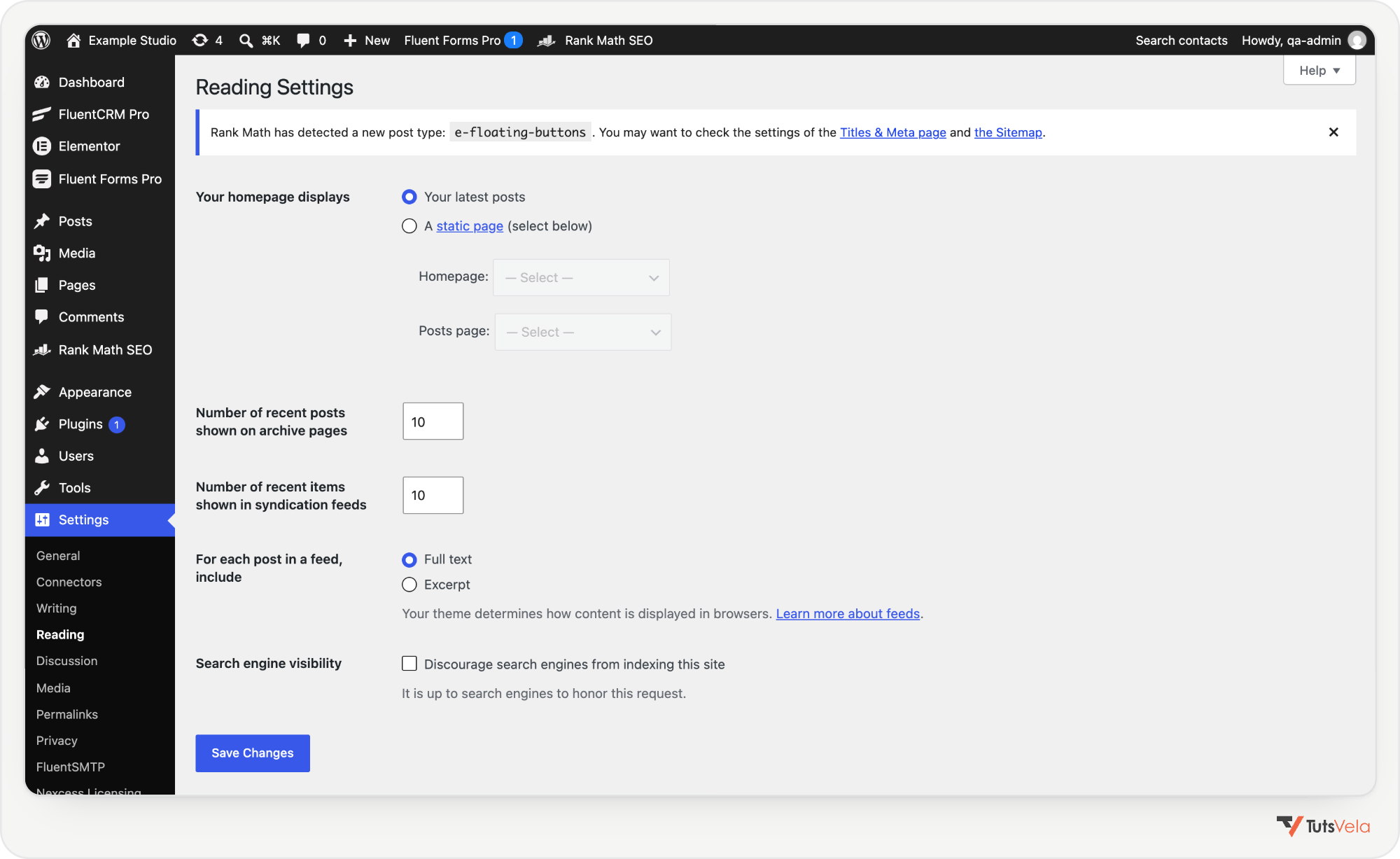
Go to Settings, Reading and find Search engine visibility. The box labelled Discourage search engines from indexing this site must be unticked on a live site. When it is ticked, WordPress adds a noindex, nofollow robots tag to every page, and the dashboard shows a “Search engines discouraged” reminder. It is often left on after a site moves from staging.
Rank Math indexing settings
In Rank Math SEO, Titles & Meta, check Global Meta and the Posts and Pages tabs: their Robots Meta should be Index, and No Snippet should not be selected unless you mean it. Then open one important article and check the editor’s Rank Math Advanced tab. Its Robots Meta, Advanced Robots Meta (Max Snippet should stay at -1, meaning unlimited) and Canonical URL fields override the defaults for that post.
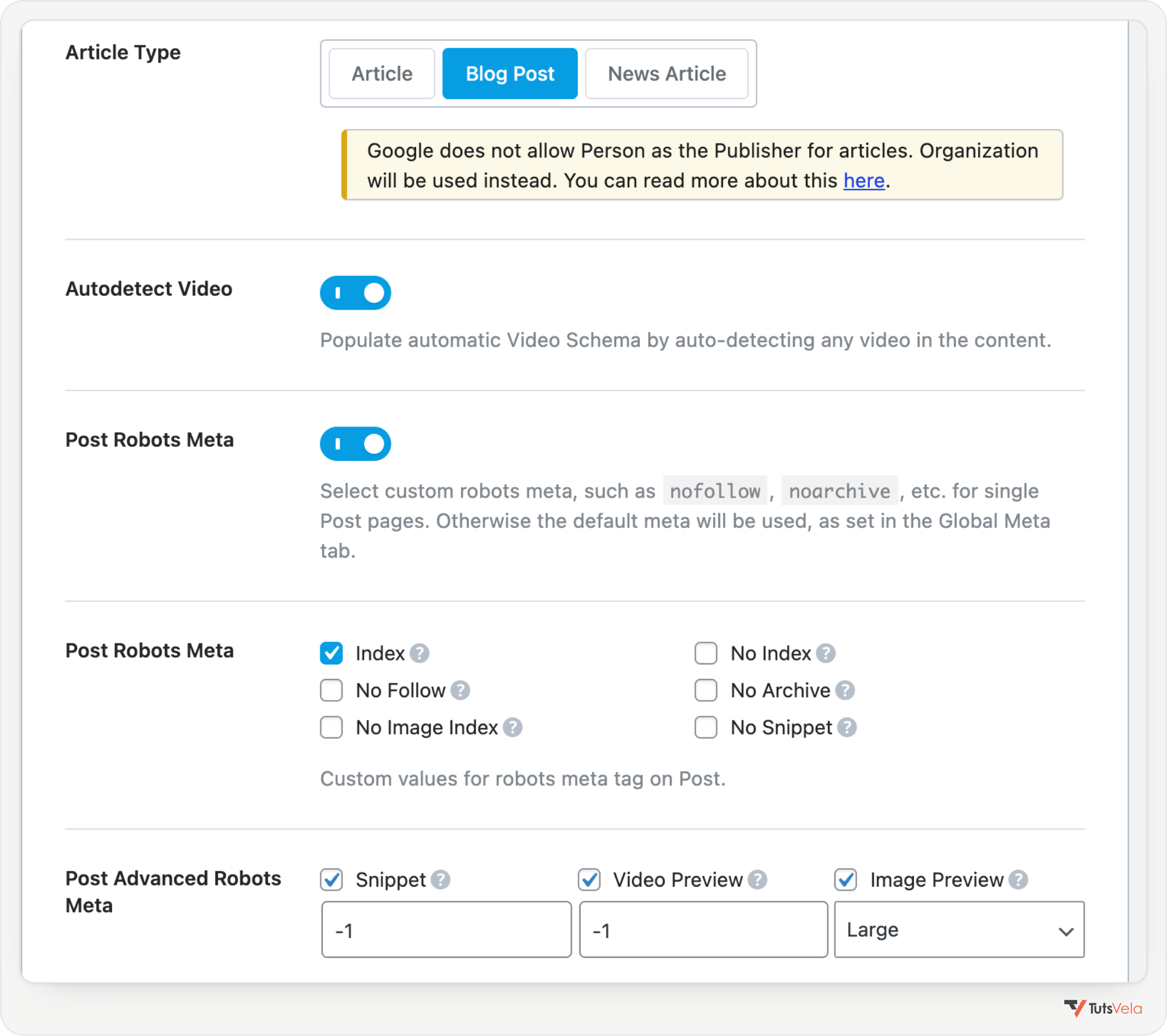
The nosnippet rule does more than hide a description. Google says it also stops a page being used as a direct input for AI Overviews and AI Mode, and max-snippet limits how much can be used. Use them only on pages you deliberately want to keep out.
XML sitemap and robots.txt
With Rank Math’s Sitemap module on, your sitemap index lives at /sitemap_index.xml. Open it in a browser and confirm your posts appear. Then open /robots.txt and make sure nothing important is disallowed for Googlebot. If a security plugin, firewall or CDN blocks Googlebot, fix that too: Google lists blocking at the host or CDN level as a common cause of crawling problems.
One distinction is worth knowing. The Google-Extended token in robots.txt controls whether Google can use your content for training Gemini models and grounding in Gemini apps. Google says it does not affect your site’s inclusion in Google Search, so blocking it does not remove you from AI Overviews.
URL Inspection in Search Console
Indexable is not the same as indexed. To check a real page, open Google Search Console, paste the full URL into the inspection bar at the top and press Enter.
Step 2: Improve Content for Readers and Search
Google’s helpful content guidance asks three questions of any page: who created it, how it was made, and why it exists. For AI features, Google adds that unique, non-commodity content based on firsthand experience is likely the biggest long-term factor. On a WordPress blog, that translates into a handful of practical edits.
Before and after: improving a WordPress tutorial
Here is a fictional example to show the idea. It is an illustration of clearer writing, not a ranking experiment, and it uses no real search data.
Before: vague
How to Speed Up WordPress
In today’s fast-paced digital world, website speed is more important than ever. There are many things you can do to make your WordPress site faster, and in this ultimate guide we will explore some of the best tips and tricks that experts use.
Posted by admin
After: useful
How to Speed Up WordPress: Caching, Images and Hosting Checks
To speed up a WordPress site, start with page caching, compress and resize images, and check your hosting response time. This guide shows each step on a real blog, with the settings we used and how to measure the result in PageSpeed Insights.
By a named author, with a link to their profile and a “last updated” date
The improved version answers the question immediately, names the specific methods, promises evidence the reader can check, and shows who is responsible for the content. The same edits make the page easier for search systems to understand, because the answer is stated plainly in text.
Google does not ban AI-generated content, but its guidance on generative AI content says to review and fact-check everything, including titles, meta descriptions, structured data and alt text. Mass-producing pages without added value can count as scaled content abuse. Where readers would wonder how a page was made, say so.
Step 3: Configure Rank Math Properly
Rank Math controls most of the metadata Google reads from a WordPress post. The settings below are worth checking on every important article. None of them guarantees visibility; they make your page clear and consistent.
|
Setting |
Where in Rank Math |
What it does |
What it does not do |
|---|---|---|---|
|
Focus keyword |
Editor, Rank Math, General tab |
Guides Rank Math’s content checks for the topic you choose |
It is not sent to Google and does not affect ranking by itself |
|
SEO title and meta description |
General tab, Edit Snippet |
Suggests the title and description Google may show |
Google may rewrite either one |
|
Canonical URL |
Advanced tab |
Names the preferred URL when similar pages exist |
It is a hint; Google can choose a different canonical |
|
Article schema |
Schema tab (default type set in Titles & Meta, Posts) |
Outputs Article or BlogPosting structured data |
It does not create rich results or AI citations on its own |
|
Author information |
Your WordPress user profile and author archive |
Feeds the author name and URL used in schema and bylines |
It cannot replace real expertise shown in the content |
|
Image alt text |
Media Library or the image block |
Describes images for screen readers and search |
Stuffing keywords into alt text is not helpful |
|
Social tab |
Editor, Rank Math, Social tab (Facebook and Twitter) |
Controls previews when the post is shared |
It has no direct effect on Google rankings |
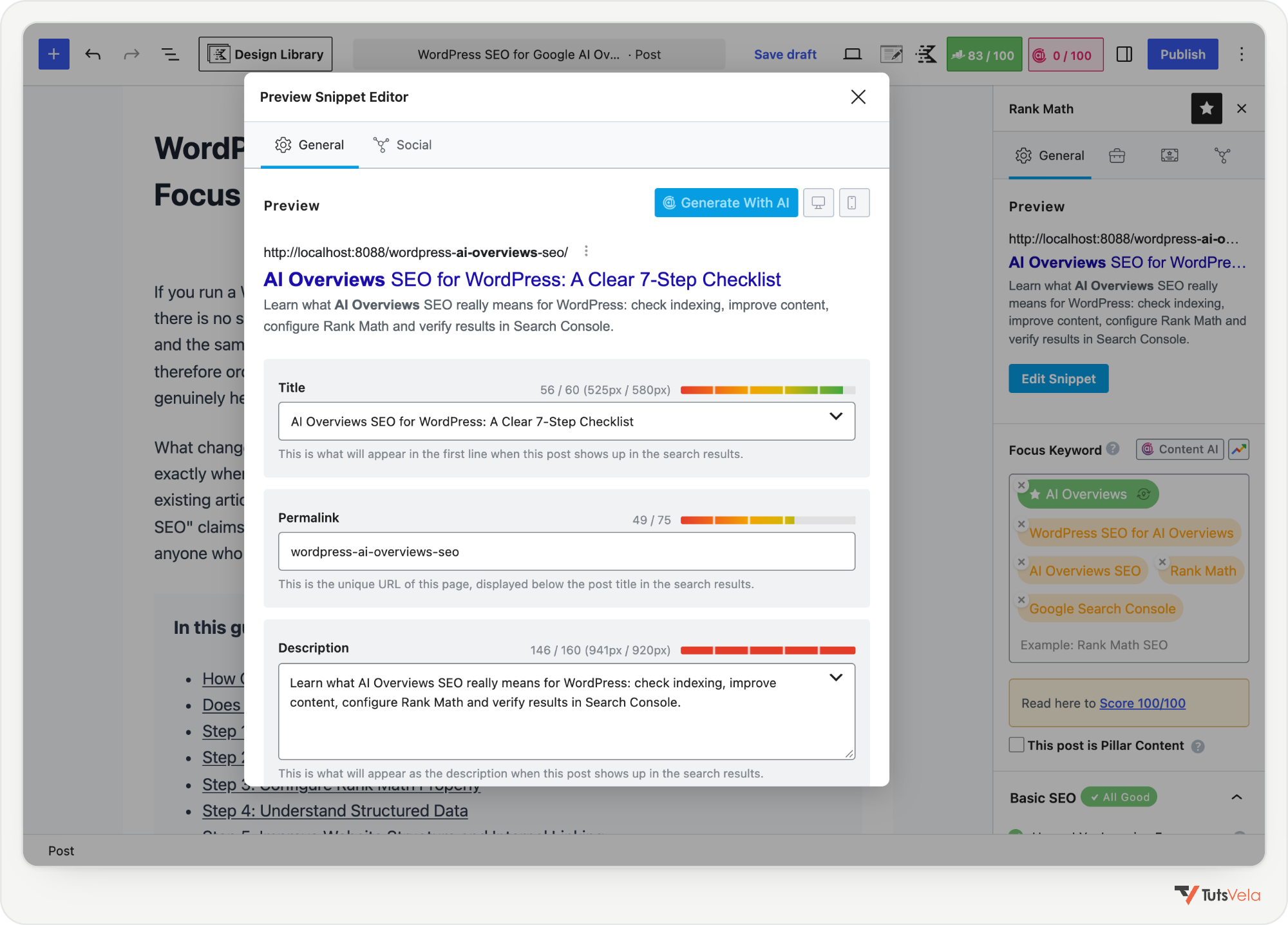
A word on the score: Rank Math’s own documentation says there are no guarantees in SEO and that a lower-scoring post can still rank well. Its 100/100 tests include a length target above 2,500 words and a 1 to 1.5 percent keyword density, which are Rank Math’s own heuristics. Google says there is no ideal page length and warns against keyword stuffing. Use the score as a checklist, not a goal.
Step 4: Understand Structured Data
Structured data describes a page in a standard vocabulary. For blog posts, Google supports Article, BlogPosting and NewsArticle. It has no required properties, but Google recommends the headline, images, publish and modified dates, and the author with a name and a URL that identifies them, such as an author page.
Rank Math generates this for you. Set the default under Titles & Meta, Posts (Schema Type Article, then Article Type Blog Post), and check individual posts in the editor’s Schema tab. Make sure your WordPress profile has a real display name and that your author archive is public, because those feed the author properties.
Structured data must describe what is visible on the page. Do not mark up FAQs, reviews or ratings that readers cannot see. Google is also clear that there is no special schema for AI Overviews, and that valid markup does not guarantee any rich result.
How to validate your markup
Step 5: Improve Website Structure and Internal Linking
Google finds and understands pages partly through links. Google’s AI features guidance lists internal links among its basic best practices, and a clear structure also helps readers keep going. In WordPress, a few decisions do most of the work:
Example: a WordPress tutorial topic cluster
A topic cluster connects one broad guide with focused articles that go deeper. Each supporting article links back to the main guide, and the guide links to each of them where the topic comes up.
Main guide
“WordPress Performance: The Complete Checklist” covers every area briefly and links out.
Supporting article
“How to Optimize Images in WordPress” goes deep on formats, sizes and lazy loading.
Supporting article
“How to Set Up Page Caching in WordPress” walks through one plugin’s settings.
Step 6: Understand AI SEO Myths
Much of the advice sold as “AI SEO” has no basis in Google’s documentation. Here is how the common claims compare with what Google and Rank Math actually say.
|
Claim |
Reality |
Source |
|---|---|---|
|
You need an llms.txt file for AI Overviews |
Google Search does not use llms.txt or similar AI text files. Rank Math calls llms.txt a proposal, not a standard |
Google AI optimization guide; Rank Math KB |
|
You need special AI schema |
There is no special schema for Google AI features. Normal structured data must match visible content |
Google AI features page |
|
Split content into tiny chunks |
Not required. Google can find the relevant part of a page that covers several topics |
Google AI optimization guide |
|
Hit a keyword density target |
Google gives no density target and treats keyword stuffing as spam. The 1 to 1.5 percent figure is Rank Math’s heuristic |
Google SEO Starter Guide; spam policies |
|
Longer articles rank better |
There is no ideal length or word count. Write what the topic and reader need |
Google SEO Starter Guide; helpful content |
|
AI-written content is penalized |
Not automatically. It must meet the same quality and spam rules, and be reviewed for accuracy |
Google guidance on generative AI content |
|
A 100/100 Rank Math score means you will rank |
Rank Math says there are no guarantees; Google never guarantees indexing or serving |
Rank Math KB; Google AI features page |
|
Blocking Google-Extended removes you from AI Overviews |
It does not affect Google Search inclusion. Use noindex or snippet controls instead |
Google common crawlers documentation |
Step 7: Monitor Results in Search Console
Search Console is the only place that shows Google’s own data about your site. Use it in this order:
Several tools estimate how often your site appears in AI answers. Google states that no third-party tool has access to its internal ranking or AI systems, so treat those numbers as estimates and rely on Search Console for Google data.
Complete WordPress AI Search SEO Checklist
|
Task |
Where to check |
Correct result |
How to verify |
|---|---|---|---|
|
Site visible to search engines |
Settings, Reading |
“Discourage search engines” unticked |
Page source has no noindex robots tag |
|
Posts indexable by default |
Rank Math, Titles & Meta, Posts |
Robots Meta: Index; No Snippet off |
Advanced tab on a sample post shows the same |
|
Sitemap available |
|
Lists your posts |
Sitemaps report shows Success |
|
Nothing important blocked |
|
Googlebot allowed |
URL Inspection, Test live URL |
|
Key pages indexed |
Search Console, URL Inspection |
URL is on Google |
Page indexing report |
|
Answer stated early |
The article itself |
First paragraph answers the question |
Read it as a newcomer |
|
Real author shown |
User profile and byline |
Name links to an author page |
Rich Results Test shows the author |
|
Article schema valid |
Rank Math Schema tab |
Article or BlogPosting, no errors |
Rich Results Test |
|
Internal links in place |
Related posts and categories |
Every post linked from somewhere |
No orphaned posts in your site crawl |
|
Results measured |
Search Console Performance |
Clicks and impressions tracked over time |
Compare date ranges, not single days |
Frequently Asked Questions
Conclusion
Preparing a WordPress site for Google’s AI features is mostly about doing the fundamentals well: make sure Google can crawl and index your pages, write content that answers questions with real experience, keep your metadata and structured data honest, and connect related articles. Then measure with Search Console instead of guessing.
Start small. Pick one existing article that matters to you, work through the checklist above, and confirm the result in Search Console. That single, verified improvement is a better foundation than any shortcut promising AI citations. If you plan to let an AI assistant work on the site itself, our guide to WordPress MCP plugins explains how to connect Claude safely.

Written by
Salman Sarwar
Founder · Full-Stack Developer, WordPress Engineer, SEO and AI Automation Specialist
Salman Sarwar founded TutsVela in 2019 and leads its web and automation projects. He records video tutorials and writes practical guides on WordPress, web development, SEO, AI tools and automation, based on the tools he uses in his own work.
WordPress · Kadence · Automation · AI micro SaaS